
The governed AI portal for back-office operations
Your prompts and scripts, as one-click Apps your whole team can run.
Build once against NetSuite, Salesforce, QuickBooks Online, Xero, Maxio or HubSpot. Everyone else clicks Run and gets a finished report. Every run governed, costed and audited. AI results, not AI chats.

- NetSuite
- Salesforce
- QuickBooks Online
- Xero
- Maxio
- HubSpot
Connected over MCP. Each workspace connects its own accounts; credentials are never shared.
Build. Publish. Run.
The person who builds an App is not the person who runs it. Builders see prompts, connectors and code. Runners see a button, a short form and a result.
- 01
Build
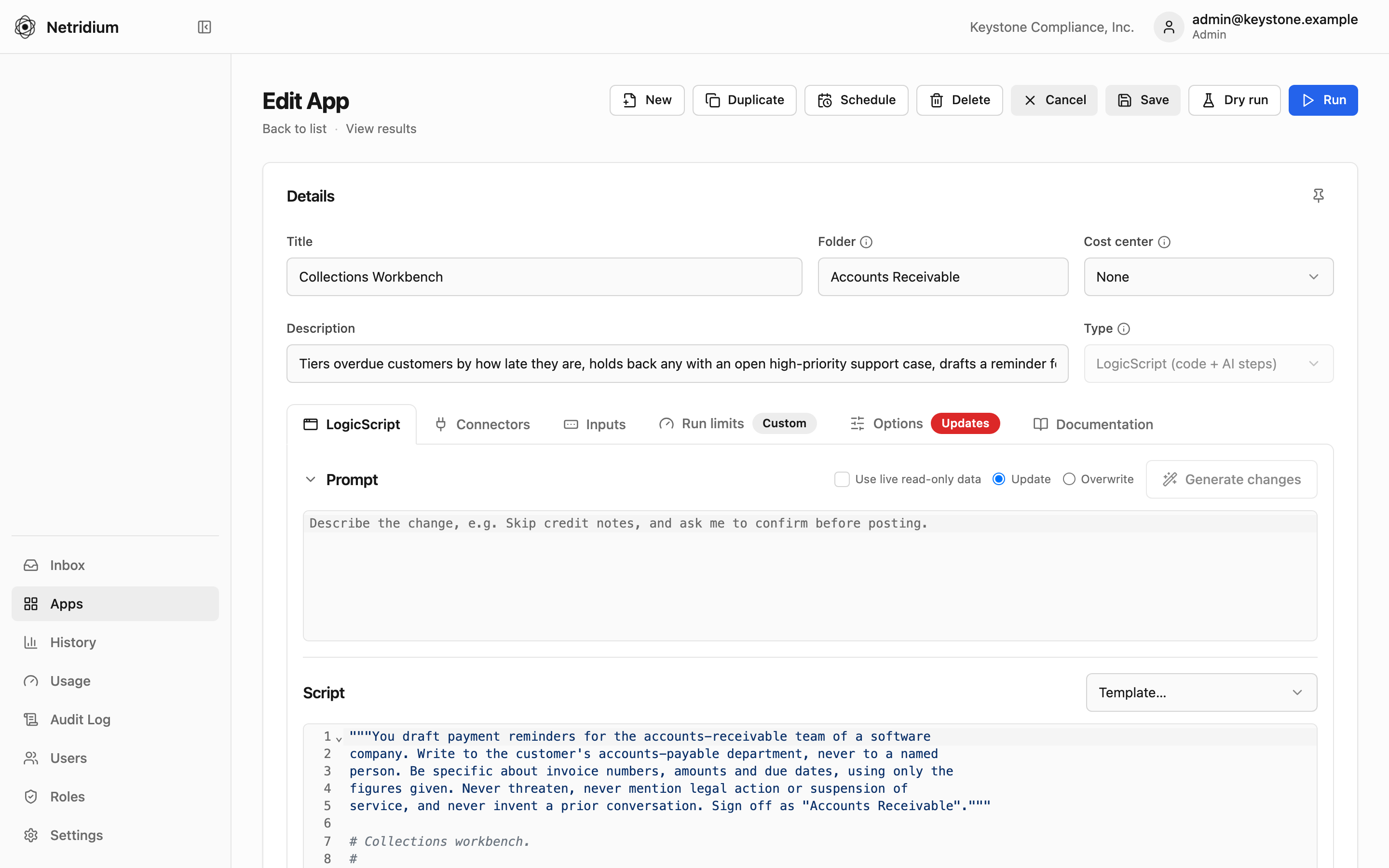
Write a Prompt in plain English, or a LogicScript when the steps must be exact. Pick the connectors it may use, add an input form, set its run limits.
- 02
Publish
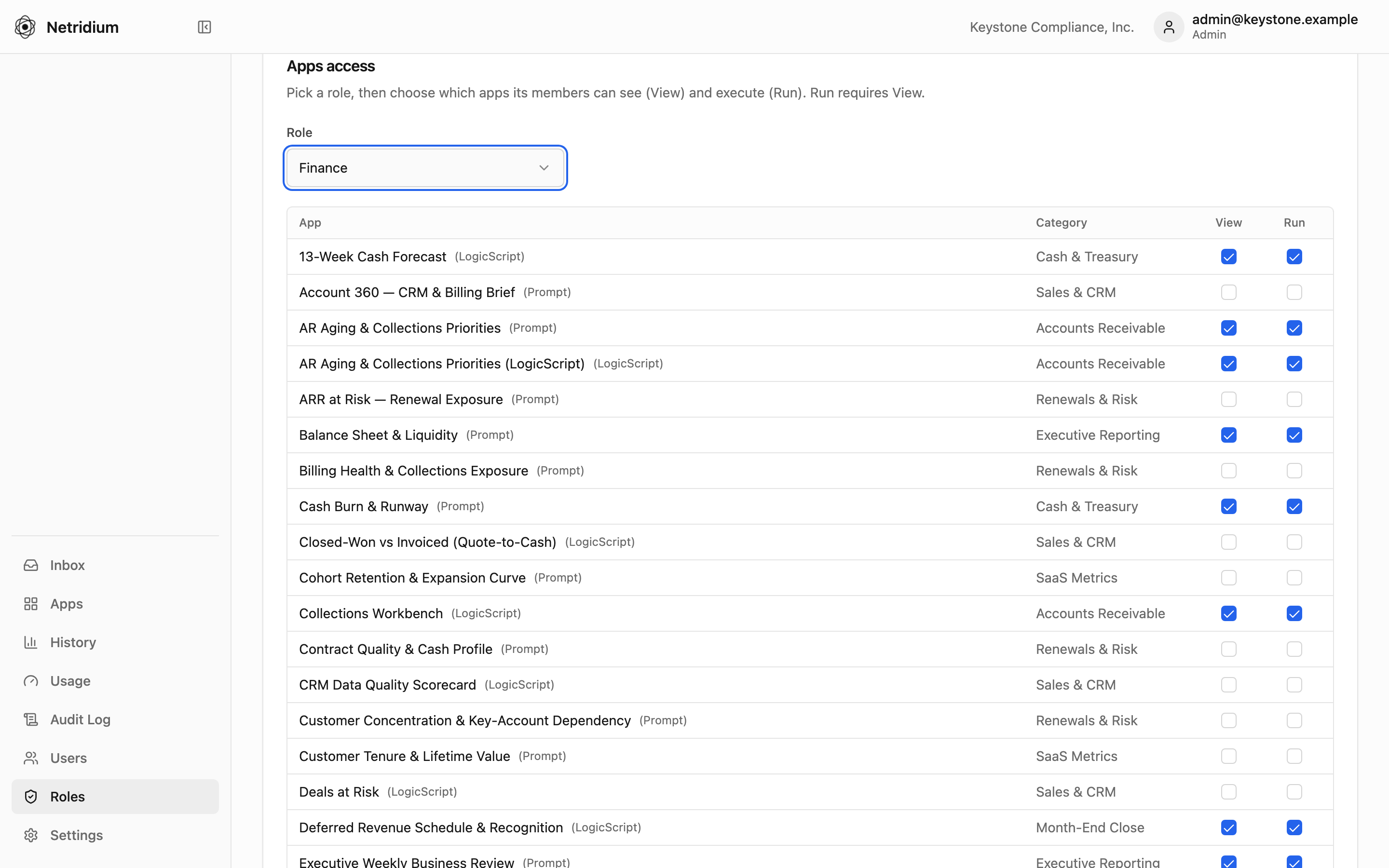
Grant View and Run per App, per role. Change or revoke it for everyone at once. Runners never see the prompt or the code.
- 03
Run
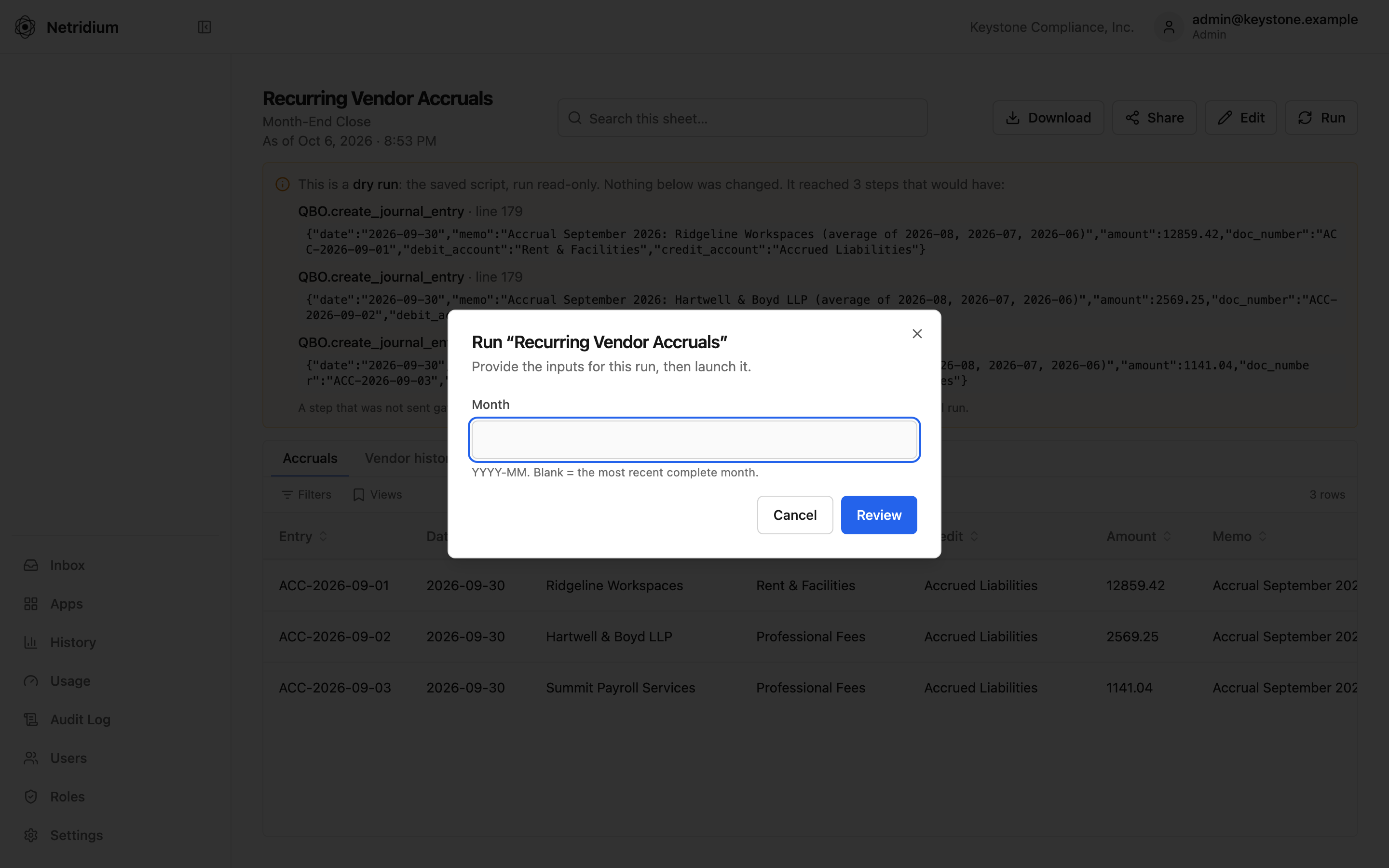
Fill the form, click Run, get a finished report: Excel, PDF, a dashboard card. Every run is recorded, costed and replayable.


Built for the people who answer to auditors.
Finance & back office
Close summaries, reconciliations, AR aging, revenue reports — run on demand or on a schedule, without touching prompts or systems.
- One click → a finished report
- Results link back to the source record
- Every run costed to a cost center
IT & admins
Connectors, roles, run limits and budgets in one place, with an audit log you can hand to an auditor.
- Read-only by default; writes granted explicitly
- Role-based View and Run per App
- Budgets and fail-closed run limits
Consultants, accountants & MSPs
Build an App once, publish it to every company you manage, and bill each one for what it used.
- One console for every company
- Versioned Catalog, managed Apps
- Per-company usage for clean rebilling
Governance isn't a feature. It's the product.
The reason to choose a portal over handing staff raw AI logins.
- Role-based access
Who can see an App, and who can run it, per App and per role.
- Complete audit trail
Who ran what, against which data, every write, every admin change. CSV export.
- Read-only by default
Writes need opt-in on the App and the connector, and a confirmation before each run.
- Every run bounded
A ceiling on cost, time and number of updates, enforced while it runs. No "no limit".
| Cost center | GL account | Runs | Amount |
|---|---|---|---|
| FIN-100 · Accounting | 6820 | 412 | $318.40 |
| SLS-220 · Sales Ops | 6820 | 186 | $142.75 |
| OPS-310 · Supply Chain | 6825 | 97 | $74.10 |
| Total charged back | 695 | $535.25 |
Start from Apps that already work.
The demo workspace ships with Apps for QuickBooks Online, Xero, Salesforce, HubSpot and Maxio. Import one, change the inputs, publish it.
- AR Aging & Collections PrioritiesQuickBooks OnlineOpen receivables in five aging buckets, ranked by dollars at risk, with a ten-name call list and a written opening for each conversation.
- Collections WorkbenchQuickBooks Online · SalesforceTiers overdue customers by how late they are, holds back any with an open high-priority support case, drafts a reminder for each one the collector picks, and logs the AR manager's approved wording as a Salesforce task.
- 13-Week Cash ForecastQuickBooks OnlineA weekly cash forecast from the ledger: receipts timed by each customer's own payment history, bills by due date, payroll and recurring spend from the recent pattern, with a minimum-cash alert.
- Income Statement — Month, Quarter & YTDQuickBooks OnlineThe P&L straight from QuickBooks: revenue, gross margin, opex and net income for the month, against the prior month and year to date, with a six-month trend and commentary on what moved.
- MRR WaterfallMaxioMonth-by-month MRR bridge from Maxio Core — opening, new, expansion, contraction and churn through to closing, with the customers behind each movement.
- Deals at RiskSalesforce · QuickBooks OnlineAn
agentstep weighs slipped close dates, silence, missing next steps, open support cases and late payment together, then ranks the pipeline by value at risk with a specific next action for each deal.

When the steps must be exact, write them.
LogicScript is a governed Python dialect for AI. Arithmetic, totals and updates run as code, never inside a model. The AI is called only where you mark it, and must return the record shape you declared. Nothing it says can change a record until the script has validated it or a person has approved it. Don't want to start from scratch? Generate writes the script from a plain-English description, using the real tools your connectors expose.
class Urgency(Shape):
    priority: Enum["low", "medium", "high"]
    reason: str = field(max_len=200, required=False)

def run(as_of: Date):
    invoices = query(QBO.Invoice, select=["Id", "DocNumber", "Balance", "DueDate"],
                     where=[QBO.Invoice.Balance > 0])
    overdue = [i for i in invoices if i.DueDate < as_of]          # code, exact
    u = ask(Urgency, "How urgent is this overdue balance?",       # one typed AI call
            data={"invoices": overdue}, model="fast")
    go = request_confirm(f"Flag {len(overdue)} invoices as {u.priority}?")  # a person decides
return {"priority": u.priority, "total": sum(i.Balance for i in overdue)}Simple pricing. Runners included.
One platform fee with builders and runners included. Prepay AI usage in dollars, or bring your own key. Enterprise adds SSO, multiple workspaces and unlimited runners.
I spent two decades building and fixing back-office systems — NetSuite, Salesforce, Maxio, QuickBooks, Xero — for companies that could not afford a surprise in the numbers. When AI arrived, every tool wanted my clients to chat with it. Controllers don't want a chat. They want the AR aging report, correct, on Monday, with a record of who ran it and what it cost. Netridium is the portal I wished I could hand them: build the App once, govern it, and let the team click Run.
Founder & CEO, Netridium · Ann Arbor, Michigan
See it run on real books.
The live demo is a read-only workspace with connected sandboxes. Click anything.